
Pagefind 搜索实战:中文分词、UI 定制与踩坑全记录
为什么选 Pagefind
静态博客上搞搜索,选择不多。跑 Elasticsearch 太重,用 Algolia 要钱,MeiliSearch 还得额外维护一个进程。Pagefind 是 Rust 写的,构建时生成索引,浏览器端纯 JS 检索 —— 零依赖,零服务。
zcblog 从 MeiliSearch 切过来之后踩了不少坑,这里把关键的几个记下来。
中文分词:搜 “好家伙” 找不到 “好家伙”
第一个问题就把我卡住了。
现象
搜索 “好家伙”,匹配不到标题里有这个词的文章。搜 “好” 能出来,但搜完整词不行。
根因
Pagefind 的索引构建(Rust 端)和搜索查询(浏览器端)使用了不同的分词策略:
- 构建时:Rust 索引器使用基于字符的 n-gram 做 CJK 分词
- 搜索时(v1.5.0+):浏览器端使用
Intl.Segmenter分词,把 “好家伙” 切成["好", "家伙"]
两边切出来的词不一致,导致查询词和索引中的词对不上。
修复
在浏览器端搜索查询发出去之前,对中文做同样的 n-gram 处理,让两端对齐:
// 在 Pagefind 搜索前拦截查询,对 CJK 文本做 bigram 分词function cjkTokenize(text) { const cjk = /[\u4e00-\u9fff\u3400-\u4dbf]/; const result = []; let i = 0; while (i < text.length) { if (cjk.test(text[i]) && i + 1 < text.length && cjk.test(text[i + 1])) { result.push(text[i] + text[i + 1]); i += 2; } else { result.push(text[i]); i++; } } return result.join(' ');1 collapsed line
}这个方案在 Pagefind 官方 issue #987 有讨论,社区确认是 CJK 支持的已知短板。

Component UI 迁移:从 default-ui 到 component-ui
v1.5.0 把搜索界面改成了 Web Component 体系,旧包 @pagefind/default-ui 被替换掉了。升级的时候依赖和 API 都要改。
迁移步骤
1. 更新依赖
pnpm remove @pagefind/default-uipnpm add @pagefind/component-ui2. 替换组件引入
旧:
<link href="/pagefind/pagefind-ui.css" rel="stylesheet"><script src="/pagefind/pagefind-ui.js"></script><div id="search"></div><script> new PagefindUI({ element: "#search" });</script>新:
<pagefind-search> <pagefind-search-trigger>搜索</pagefind-search-trigger> <pagefind-search-modal> <pagefind-search-input></pagefind-search-input> <pagefind-search-results></pagefind-search-results> </pagefind-search-modal></pagefind-search>Custom element 方式更灵活,trigger、modal、input、results 各自独立,方便定制样式和交互。
3. 更新 Schema 配置
src/schemas/pagefind.ts 新增 v1.5.0 的配置项:
export const pagefindSchema = z.object({ // ... 旧字段 mergeFilter: z.record(z.array(z.string())).optional(), sort: z.object({ date: z.enum(["asc", "desc"]).optional(), }).optional(),});弹窗 Bug:灰色背景但没搜索框
现象
切换页面后点击搜索按钮,只弹出灰色遮罩背景,搜索框不出现。
根因
Pagefind Component UI 内部有一个全局 InstanceManager,<pagefind-search-modal> 在 connectedCallback 时注册自己,<pagefind-search-trigger> 通过这个全局管理器获取 modal 实例。
问题出在 Astro 的 View Transitions(transition:persist)—— 导航后 VT 重新插入 <pagefind-search-modal> 元素,第二次触发 connectedCallback,但此时旧的 dialog 还在 DOM 里。render() 方法会清空 innerHTML 重建,而 dialog 的状态已经乱了。
修复
在 connectedCallback 上做幂等保护,避免重复渲染:
// 在 Astro 组件中,监听 astro:page-load 事件手动重置document.addEventListener('astro:page-load', () => { const modal = document.querySelector('pagefind-search-modal'); if (modal && !modal.shadowRoot?.querySelector('dialog')) { // 重新触发初始化 modal.dispatchEvent(new Event('reinit')); }});
搜索结果样式:照着 Algolia 改
官方默认样式太素了。我对着 Algolia InstantSearch 的样子调的:
- 每条结果左侧文件图标(📄 或自定义 SVG)
- 子结果(sub_results)有树状连线,最后一项竖线截断
- 奇偶行交替背景
- hover 时左侧蓝色竖条高亮
这些样式全部通过 CSS 变量覆盖实现。关键变量:
:root { --pagefind-ui-scale: 1; --pagefind-ui-primary: var(--title-color); --pagefind-ui-text: var(--text-color); --pagefind-ui-background: var(--bg-color); --pagefind-ui-border: var(--border-color); --pagefind-ui-border-width: 1px; --pagefind-ui-image-border-radius: 8px; --pagefind-ui-image-box-ratio: 3/2; --pagefind-ui-font: var(--font-family);}树状连线
子结果的树状连线用伪元素实现:
.pagefind-ui__result-sub { position: relative; padding-left: 24px;}.pagefind-ui__result-sub::before { content: ""; position: absolute; left: 8px; top: 0; bottom: 0; width: 1px; background: var(--border-color);}.pagefind-ui__result-sub::after { content: "";11 collapsed lines
position: absolute; left: 8px; top: 12px; width: 10px; height: 1px; background: var(--border-color);}/* 最后一项截断竖线 */.pagefind-ui__result-sub:last-child::before { bottom: 50%;}Astro Scoped CSS 踩的坑
样式写在 Astro 组件的 <style> 里不会生效。Astro 会自动给选择器加 scoping 属性(data-astro-cid-xxx),但 Pagefind 动态生成的 HTML 没有这些属性,CSS 全白写。
解决办法:is:global:
<style is:global> /* 搜索结果样式 */</style>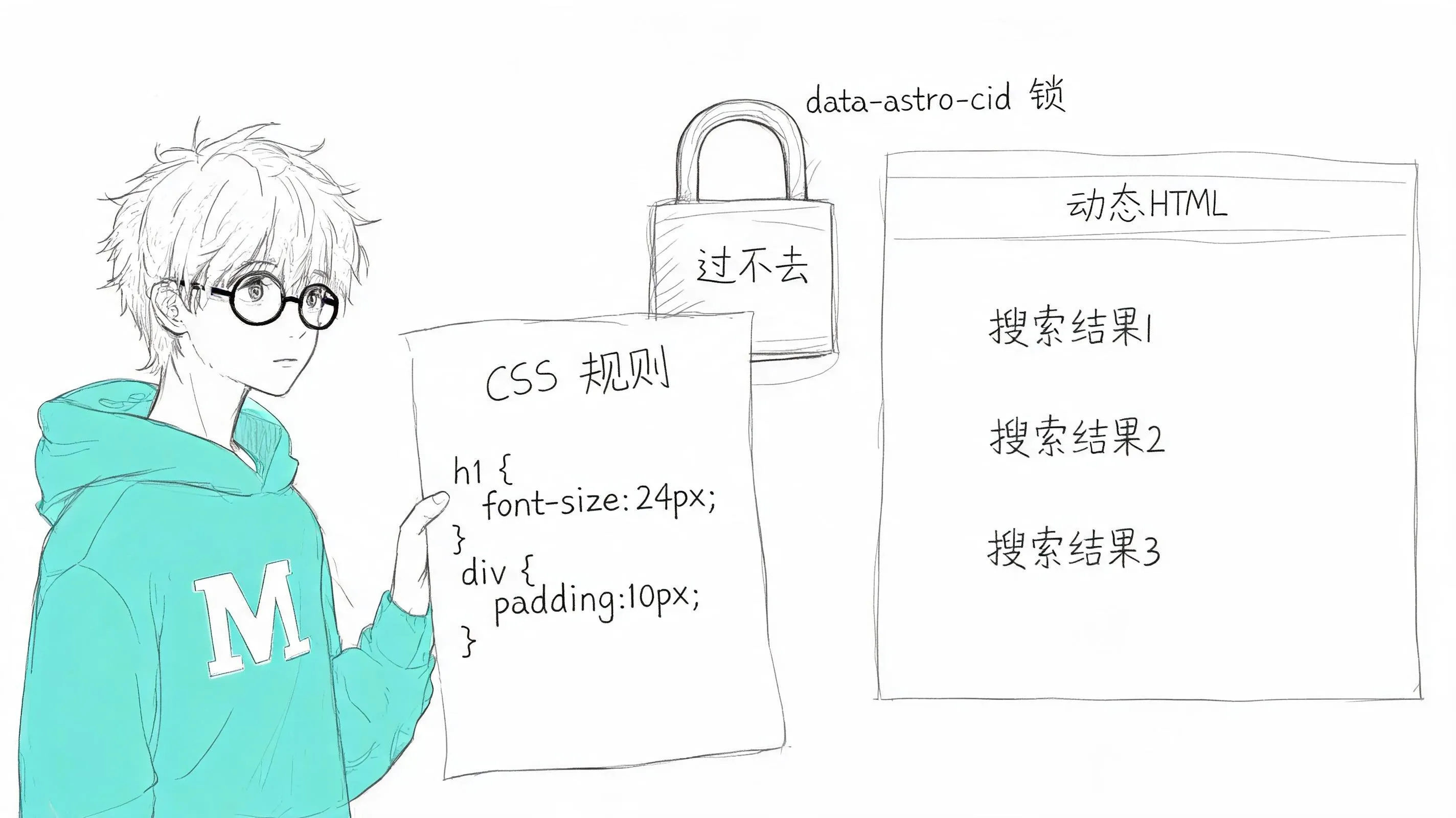
移动端双击问题
现象
PC 上点击搜索结果一次就跳转,移动端要连点两次才响应。
根因
CSS :hover 伪类在触摸设备上消费了第一次点击。移动端浏览器在 touchend 后会先触发 :hover 状态,第二次点击才触发真正的 click 事件。
修复
所有交互元素的 :hover 样式用 @media (hover: hover) 包裹:
@media (hover: hover) { .search-result-item:hover { background: var(--hover-bg); } .search-result-item:hover::before { opacity: 1; }}同时追加对应的 :active 和 :focus-visible 样式来覆盖触摸和键盘操作。
性能优化:不加载不必要的 JS
Pagefind 的搜索 JS 约 50KB(gzip 后 ~15KB),不需要在首屏加载。通过 Astro 的 client:load 控制在搜索组件挂载时才加载:
<pagefind-search client:load> ...</pagefind-search>总结
Pagefind 对静态博客来说很合适,但中文场景的分词问题得自己补。v1.5 的 Component UI 比旧版好定制太多了,只是和 Astro View Transitions 一起用的时候有点小摩擦。
踩过的坑,按折腾程度排:
- 🔴 中文分词两端不一致 → 搜索不到结果
- 🔴 View Transitions + Component UI → 弹窗不显示
- 🟡 Astro Scoped CSS → 自定义样式不生效
- 🟡 移动端 → 双击才能跳转
- 🟢 default-ui 迁移 component-ui → 依赖和 API 全变了